
If you're using Cliniko for booking appointments in your clinic, you've probably wondered how to track those bookings in Google Analytics 4 (GA4) and Google Ads.
Without conversion tracking, you're flying blind. You can't see which campaigns, keywords, or ads are actually driving appointments. You might be wasting budget on campaigns that look good on clicks but deliver nothing.
The good news: tracking Cliniko bookings is absolutely possible. You have two options depending on your setup and how much you want to preserve your website's user experience.
Why Cliniko Tracking Is Traditionally Considered Difficult
Before we get into the solutions, it helps to understand why this is a problem in the first place.
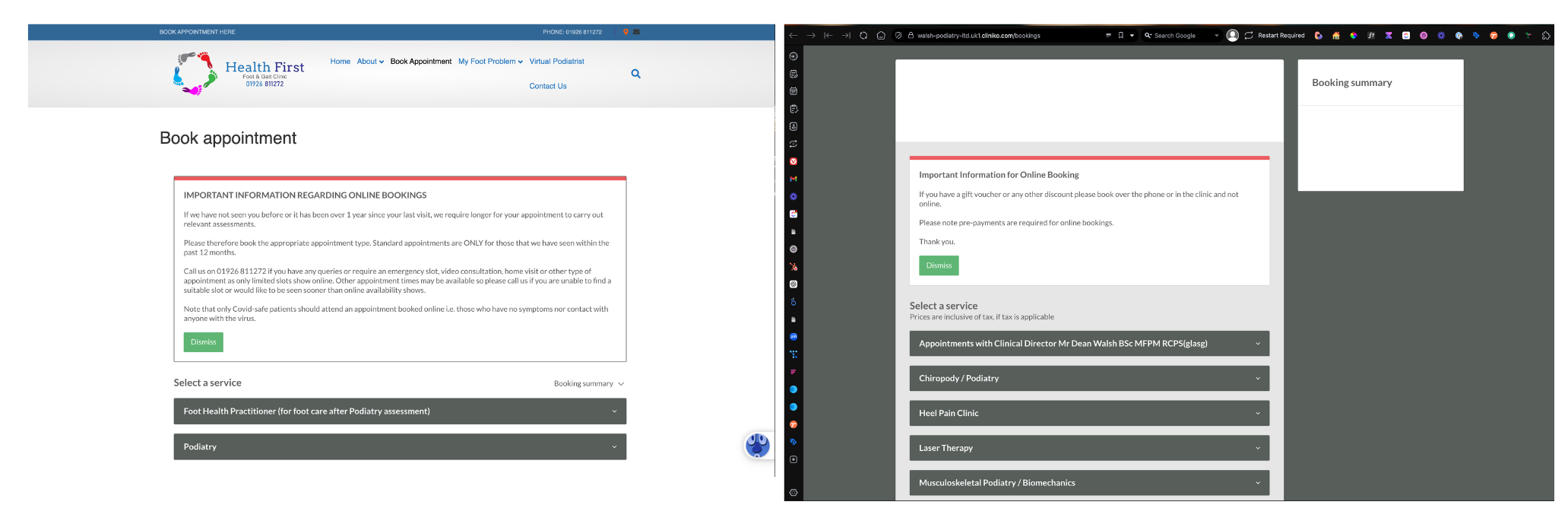
When you embed Cliniko's booking widget on your website, it loads inside an iframe - essentially a window into another website (cliniko.com) displayed within your page. The visitor stays on your site visually, but the booking form itself is running on Cliniko's domain.
This creates a tracking problem. When someone clicks from a Google ad to your website, that source information (called "referrer" data) travels with them. Your analytics can see they came from Google Ads. But when they interact with the embedded Cliniko form, that referrer information doesn't pass through to Cliniko's system. The iframe is treated as a separate context.
The result? You can technically track that a booking happened, but you lose all the source data. Every booking appears as "direct" traffic in Cliniko's reporting, regardless of whether the patient came from a paid ad, organic search, or social media.
For most clinic owners, this is frustrating. You're spending money on marketing but can't see which channels actually drive appointments.
A Quick Reassurance
Before you panic - this limitation doesn't mean your marketing is unmeasurable. For most clinic websites, valuable interactions like phone calls and contact form submissions happen on your main site, not inside the booking iframe. These are fully trackable with standard GTM setups.
So while accurate Cliniko booking attribution is valuable, you're not completely blind without it. Your phone and form tracking will still show you how well your marketing generates enquiries. The booking tracking adds another layer of insight, but it's not the only data point that matters.
Option 1: Use Cliniko's Hosted Booking Portal (Simpler Setup)
The most straightforward approach is to use Cliniko's hosted booking portal instead of embedding the form on your website.
How It Works
Instead of embedding the booking form directly on your site, you add a button or link that takes visitors to your Cliniko-hosted booking page (something like yourclinic.au2.cliniko.com). When they complete a booking, they land on a confirmation page that you can track as a conversion.
The Trade-Off
The downside is that visitors leave your website to complete their booking. The page will have Cliniko's branding rather than yours, which can feel less polished. But if tracking simplicity is your priority, this is the easier path.
What You Can Track
With the hosted portal approach, you unlock full visibility into your booking data:
Accurate Booking Source Tracking
Unlike the embedded form which loses referrer information, the hosted portal allows tracking data to flow through properly. You'll see exactly where each booking came from - whether it was a Google Ads click, an organic search result, a Facebook ad, or a direct visit. This is the difference between knowing "we got 15 bookings this month" and knowing "we got 8 bookings from Google Ads, 4 from organic search, and 3 from Facebook."
Improved Conversion Insights
With source data attached to each booking, you can start making smarter decisions about your marketing spend. You might discover that your Google Ads campaigns drive twice as many bookings as social media, or that certain keywords convert far better than others. This lets you double down on what works and cut what doesn't.
Enhanced Reporting
Your reports will finally reflect the complete picture. When bookings are correctly attributed to their sources, you can confidently assess campaign performance, justify budget allocation, and demonstrate ROI. No more guessing whether your ads are working - you'll have the data to prove it.
Google Ads Optimisation
Perhaps most importantly, you can import these conversions into Google Ads and let the algorithm optimise towards actual bookings. Smart Bidding strategies like Target CPA or Maximise Conversions become far more effective when they're working with real appointment data rather than just clicks or page views.
Setting Up Tracking for the Hosted Portal
Here's how to set up conversion tracking in GA4 using Google Tag Manager:
Step 1: Create a New Tag in GTM
Log into Google Tag Manager and click "New Tag" from your workspace. Name it something clear like "Cliniko Booking Complete."
Step 2: Configure the GA4 Event Tag
Click "Tag Configuration" and select Google Analytics: GA4 Event from the list.
Enter your GA4 Measurement ID (find this in GA4 under Admin > Property > Data Streams).
For the event name, use "purchase" - this aligns with a completed transaction and works well for reporting.
Step 3: Set Up the Trigger
Click "Triggering" and create a new trigger with these settings:
Trigger type: Page View
This trigger fires on: Some Page Views
Condition: Page Path — contains — bookings/confirmation
This fires the conversion event whenever someone lands on Cliniko's booking confirmation page.
Step 4: Save and Test
Save your tag and use GTM's Preview mode to test. Complete a test booking and confirm the event fires on the confirmation page.
Once verified, publish your changes. GA4 will now receive conversion events for completed bookings.
Step 5: Import into Google Ads
To use this conversion for Google Ads optimisation, import it from GA4:
In Google Ads, go to Goals > Conversions > Summary
Click the blue "+" button and select "Import"
Choose "Google Analytics 4 properties" and select your purchase event
Configure your conversion settings and save
Your campaigns can now optimise towards actual bookings.
Option 2: Track Directly from Embedded Iframes (Advanced)
If you want to keep visitors on your website throughout the booking process, there's another way. This method is more complex to implement, but it preserves your user experience and branding.
The Common Misconception
You'll often hear that tracking embedded Cliniko forms is impossible. Agencies might tell you "iframe tracking can't be done" and suggest the hosted portal as the only option. Even Cliniko's own documentation suggests you need to use the hosted portal for conversion tracking.
This isn't quite true.
What's Actually Possible
Browsers have a mechanism called the postMessage API that allows iframes to communicate with their parent pages. It's designed for exactly this kind of situation - when an embedded element needs to tell the main page that something happened.
Cliniko's embedded iframe does use postMessage to communicate with your website. When certain actions happen inside the iframe - including booking completions - messages are sent to the parent page. These messages aren't documented for external use, but they exist.
With the right Google Tag Manager setup, you can listen for these messages and fire your conversion tracking when a booking completes. The visitor never leaves your website, your branding stays consistent, and you still get full conversion data flowing into GA4 and Google Ads.
The Benefits of This Approach
For clinics that care about user experience, this method has clear advantages:
Seamless Patient Journey - Visitors stay on your website from start to finish. They don't get redirected to a different domain that looks and feels different from your site.
Consistent Branding - Your website's design, colours, and messaging remain visible throughout the booking process. This builds trust and looks more professional.
Lower Drop-Off Risk - Any time you send visitors away from your site, you risk losing them. Keeping the booking process embedded reduces friction.
Same Tracking Capabilities - You still get full source attribution, conversion data, and the ability to optimise Google Ads towards bookings. The data quality is equivalent to the hosted portal method.
Why This Requires Specialist Help
I'm not going to walk through the exact implementation here, for a few reasons:
Every GTM setup has nuances that affect how this needs to be built
The listener needs proper origin validation and error handling to avoid security issues
Getting it wrong means false conversions (inflating your data) or missed conversions (defeating the purpose)
It needs to work correctly with your consent management platform
The implementation needs testing across different browsers and devices
If you have an experienced GTM specialist who understands postMessage and dataLayer mechanics, they can investigate the events and build a reliable implementation. If you don't have that expertise in-house, this is the kind of work worth hiring someone (like us ;)) for.
Which Option Should You Choose?
Choose the hosted portal if:
You want a simpler setup you can manage yourself
You're comfortable with visitors leaving your site to book
You don't have GTM expertise in-house
Choose iframe tracking if:
Keeping visitors on your website matters to you
You want a seamless, branded booking experience
You're willing to invest in specialist implementation
Both options give you the conversion data you need. The difference is user experience and implementation complexity.
Don't Forget Your Other Conversions
Whichever Cliniko tracking method you choose, remember that bookings aren't your only valuable conversion. For most clinics, phone calls and contact form submissions are equally important - and often easier to track.
Phone Calls
Many patients prefer to call, especially for initial enquiries or if they have questions before booking. Make sure you're tracking:
Calls from your website using a click-to-call tracking setup in GTM
Call extensions on your Google Ads (these are tracked automatically when configured)
Call-only ads if you're running them
Phone calls often represent your highest-intent leads. Someone willing to pick up the phone is usually closer to booking than someone browsing your website.
Contact Form Submissions
If you have a contact form or enquiry form on your site, this should be tracked as a conversion. These are straightforward to set up in GTM - either by tracking the form submission event or by firing on a thank you page.
Email Clicks
If you display your email address on your website (as a mailto: link), you can track clicks on that link as a conversion. It's a softer signal than a form submission, but it still indicates intent.
Why This Matters
Combined with Cliniko booking data, these conversions give you a complete picture of how your marketing drives patient enquiries. You might find that Google Ads drives more phone calls while organic search drives more online bookings. That kind of insight helps you understand the full patient journey, not just one piece of it.
Need Help Setting This Up?
If you're an existing client, get in touch and we'll configure your Cliniko tracking - whether that's the hosted portal setup or the more advanced iframe approach.
If you're not yet a client but you're struggling to track conversions from your clinic website, we specialise in exactly this kind of implementation. Healthcare practices are one of our core areas, and we've solved Cliniko tracking for physios, psychologists, dentists, and allied health providers across the UK and Australia.